
If your company already pays for Claude Team, the move to Enterprise is not really about size, because both plans cover teams of 20 to 150 people. The Claude Team vs Enterprise choice comes down to two things: whether you need identity, audit and compliance controls that Team does not have, and whether you prefer a seat with usage included or a seat plus consumption. Claude Team is for teams of 2 to 150 people and costs €18 per person per month on annual billing, with usage included up to per-seat limits. Claude Enterprise costs USD 20 per seat per month, billed annually, plus everything the team uses at API rates. It is available from 20 seats online or from 50 through the sales team.
Dollar figures are list prices from claude.com/pricing as we captured it on 5 October 2026, excluding tax. The Spanish version of the page showed the Team seat in euros and Enterprise in US dollars.
Claude Team vs Enterprise at a glance
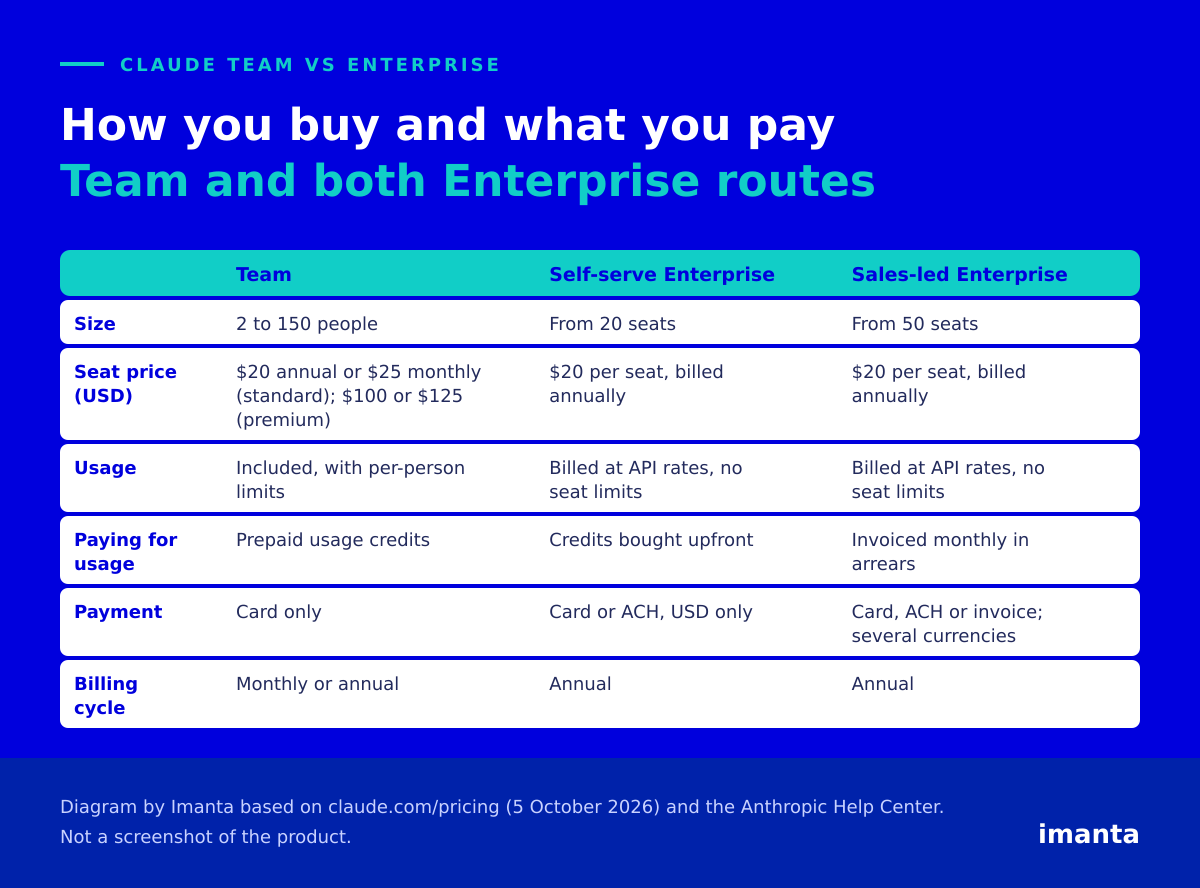
In the Claude Team vs Enterprise price comparison the seat looks identical: $20 for a standard Team seat on annual billing and $20 for an Enterprise seat. What differs is what that $20 buys. Team includes usage, while Enterprise only buys access, so Enterprise can never cost less than an annual standard Team seat for the same person. It can cost less than a premium seat, as the next section shows.
Claude Team vs Enterprise billing: fixed quota or consumption
With Team you buy capped capacity. A standard seat gives 1.25x Pro’s usage per session plus a weekly limit, a premium seat gives 5x the standard one, and limits are per person, so a heavy colleague does not slow down the rest. When someone runs out, the organisation can prepay usage credits. With Enterprise the seat gives access to Claude, Claude Code and Cowork, and every token is billed separately at API rates with no per-seat limits. Admins can cap spending by organisation and by user in both plans, and by group in Enterprise.
To get a feel for the second model, take one heavy user who consumes 10 million input tokens and 2 million output tokens in a month. That volume is our assumption, not a measurement, and the sums ignore prompt caching. At the API rates on the 5 October page:
| Model | Rates per million tokens (input / output) | Usage cost | Enterprise total with the $20 seat |
|---|---|---|---|
| Sonnet 5.5 | $2 / $10 | $40 | $60 |
| Opus 5.5 | $4 / $20 | $80 | $100 |
| Fable 5.1 | $10 / $50 | $200 | $220 |
A premium Team seat on annual billing costs $100. With Opus 5.5 that heavy user costs exactly the same in Enterprise, with Sonnet 5.5 it is cheaper and with Fable 5.1 it is more than double. The model people choose moves the bill more than headcount does, so in any Claude Team vs Enterprise comparison we would measure what each profile uses first. If you switch on US-only inference, usage is billed at 1.1x, and neither plan includes API access, as we explain in Claude API vs the Claude app.
Claude Team vs Enterprise on security and administration
A lot of what people assume is Enterprise-only is already in Team. According to the pricing page:
| Feature | Team | Enterprise |
|---|---|---|
| SSO, domain verification, central billing, usage analytics, spend controls | Yes | Yes |
| Role-based access with granular permissions | No | Yes |
| SCIM, audit logs, Compliance API and custom data retention | No | Yes |
| Domain capture of personal accounts | No | Yes |
| HIPAA-ready offering and inference hooks | No | Yes |
Enterprise also adds network-level access control with an IP allowlist, and Anthropic’s help article lists customer-managed encryption keys. Domain capture is the least known: admins can bring into the organisation the personal accounts created with company emails, and each person gets at least 30 days to merge their data or start fresh. SSO, in contrast, does not settle the Claude Team vs Enterprise decision, because Team already has it.
Five signs that it is time to move
In the Claude Team vs Enterprise decision, Team is enough more often than people think: no minimum of 20 seats, monthly billing if you want it, and a cost known the day you sign. We would start moving when one of these happens:
- Someone outside will ask who did what with Claude. An internal audit, a client demanding traceability or a regulated sector. Without audit logs or custom retention, Team cannot answer.
- Joiners and leavers can no longer be handled by hand. With SCIM the Claude account follows the employee in your directory.
- Personal accounts use the company email. Only Enterprise can claim them.
- Per-person limits slow work down and handing out credits has become a chore. Enterprise has no seat limits.
- You will pass 150 people, Team’s ceiling.
Our view at Imanta is that governance, not headcount, triggers the jump. We would not leave Team because the company reached 40 people, but we would the day an auditor or a client asks for traceability. If none of the five signs applies, nothing in the Claude Team vs Enterprise comparison justifies the extra moving parts. Team has its own traps: you pay upfront, removing someone gives no refund because the seat stays free for someone else, and a pending invitation already takes a seat.
Self-serve or sales-led Enterprise
Within Claude Team vs Enterprise there is a second fork, because Enterprise itself comes two ways with the same features and the same seat price. Self-serve is bought online from 20 seats, accepts card or ACH in dollars only, and usage is bought upfront as credits. The sales-assisted route starts at 50 seats, supports invoicing and several currencies, bills usage monthly in arrears and adds dedicated customer success management. If you need an invoice or a currency other than the dollar, that is the route. One detail for the self-serve side: an ACH payment can take up to five business days to activate the plan.
How to move from Team to Enterprise
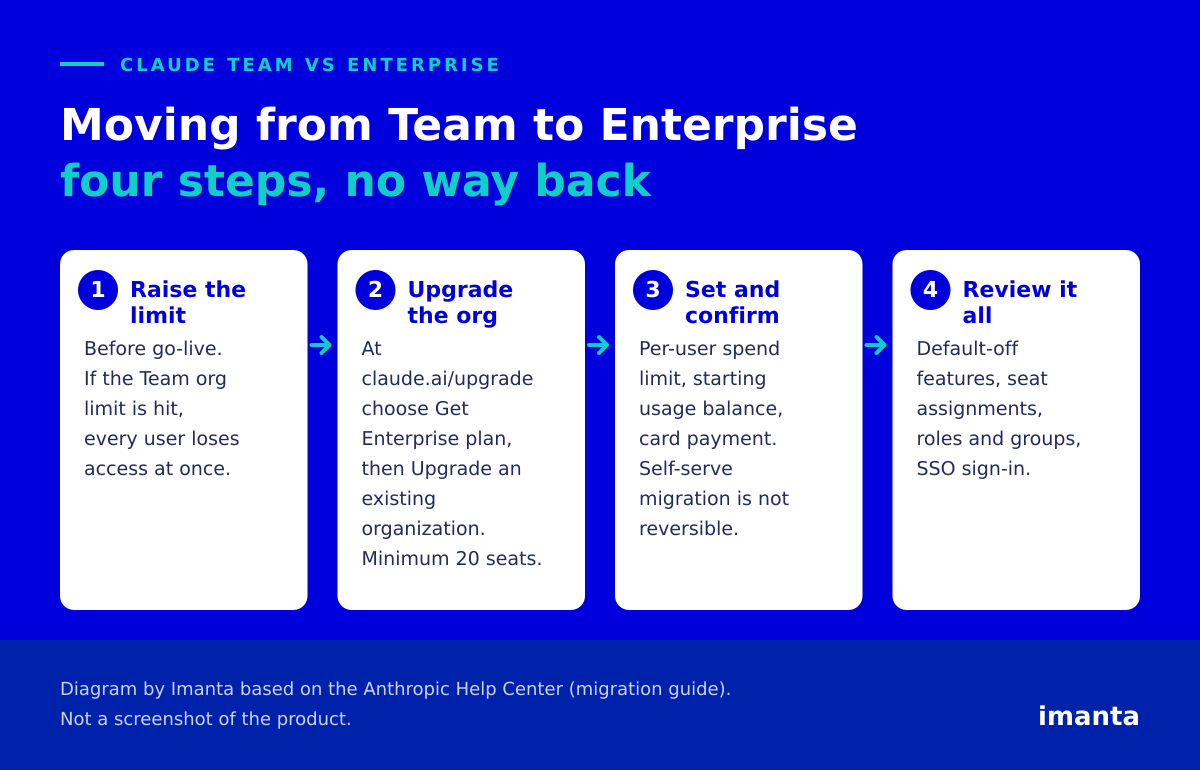
Once the Claude Team vs Enterprise decision is made, Anthropic recommends upgrading the same organisation: chats, projects, memberships and roles are kept, and unspent credits carry over. First, raise your Team spend limit before go-live, because once the organisation-level limit is reached every user loses access immediately. In the self-serve flow you go to claude.ai/upgrade, choose to upgrade an existing organisation, set the seats (20 minimum), a per-user spend limit and a starting balance, and confirm. The step has no way back.
The work comes afterwards. Skills, code execution and file creation, Claude Design, Slides and Docs, and Claude in Chrome are off by default in Enterprise, so an admin must switch them on again, and what people created comes back with them. Some users may appear with no seat assigned and cannot get in until an admin fixes it. Turning on SSO forces everyone to sign in again. Count on a short admin task list after the Claude Team vs Enterprise switch, and schedule it before go-live.
Frequently asked questions
What is the minimum number of users for Claude Enterprise?
20 seats if bought online and 50 through the sales team.
In Claude Team vs Enterprise, which plan has SSO?
Both. SSO is in Team; SCIM, audit logs and custom retention are Enterprise features.
With Claude Team vs Enterprise, can you go back after migrating?
Self-serve migration from Team to Enterprise is not reversible.
What is the price difference in Claude Team vs Enterprise?
Team costs €18 per person per month on annual billing, with usage included. Enterprise costs USD 20 per seat per month, billed annually, plus usage at API rates.
What to do now
Before you ask sales for a quote, write down three things: how many people will use Claude in twelve months, which audit or retention requirement really applies to you, and how much each profile uses today. If the answer to the second is none, Team is your plan. To compare the plans profile by profile, start from our guide to choosing between Pro, Max, Team and Enterprise. If you would like help with the Claude Team vs Enterprise decision, our Claude page explains how we work as implementers.
Sources
- Claude pricing (Spanish version, captured 5 October 2026).
- What is the Team plan.
- What is the Enterprise plan.
- How am I billed for my Enterprise plan.
- Migrate your organization from Team to Enterprise.
- Groups and group spend limits on Enterprise.
Content produced by Imanta with AI assistance, reviewed and signed by Guillermo Vilarroig. Sources linked above. Data checked on the dates shown. Last reviewed: 19 November 2026.