
You are about to pay for Claude seats and someone, quite fairly, asks what the company gets for the money. To measure AI ROI, start with hours: how many hours a week your team spends on a task, what share of that time AI can take over, and what those hours are worth at internal cost. With that number you choose a Claude plan by the capacity it frees up, not by the price per user.
The price per user is the easy figure to find, which is exactly why it ends up deciding things. To measure AI ROI properly, the figure that matters is a different one: how many hours each person using Claude will free up. Without it you are comparing plans blind. Prices and what each plan includes are in our guide to Claude Free, Pro and Max plans; this article is the step before that one.
Prices are in dollars, from claude.com, checked on 5 October 2026, excluding tax. The calculation method is Imanta’s own, revised on 5 October 2026.
How to measure AI ROI, task by task
To measure AI ROI, the unit is the task, then the person, then the department. For each task you need six data points: what the task is and which department does it; how often it is done and at what volume; how many hours a week the team spends on it in total, not each person separately; what data it uses and which system it lives in (ERP, CRM, email); what kind of AI fits it, whether generative, text classification or automation; and what percentage of the time AI can take over.
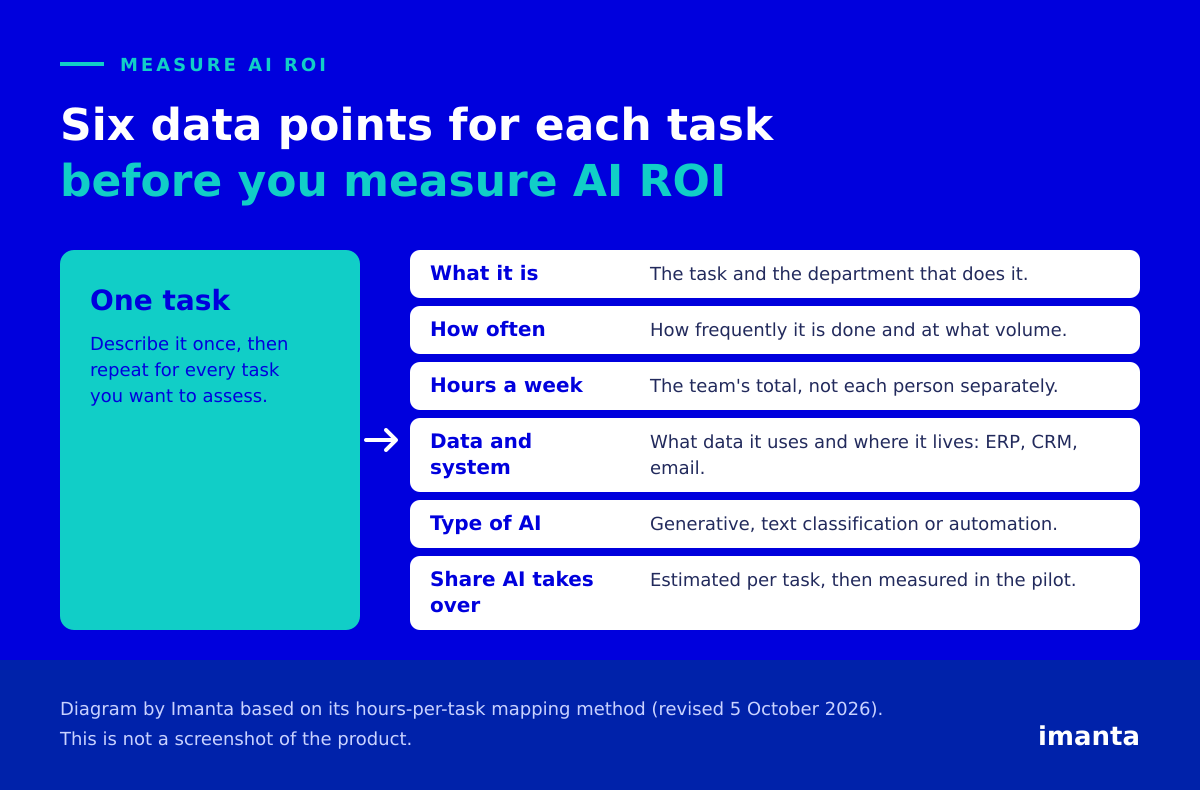
Be generous with the wish list too: what does not get done today because nobody has the time. That is often where the biggest return sits, and it never shows up in a time sheet. As for the sixth data point, the percentage AI takes over has no generic value when you measure AI ROI: it is an estimate for each task, and the pilot is what measures it. If you cannot defend a percentage for a task, write down your guess, mark it as a guess and let the pilot correct it.
Our advice if you want to measure AI ROI is to start with one week of hours logged by task, rather than a list of users. One task described properly is worth more than twenty without detail, because the formula below is only as good as the hours you feed it.
From hours to FTE and euros: the formula to measure AI ROI
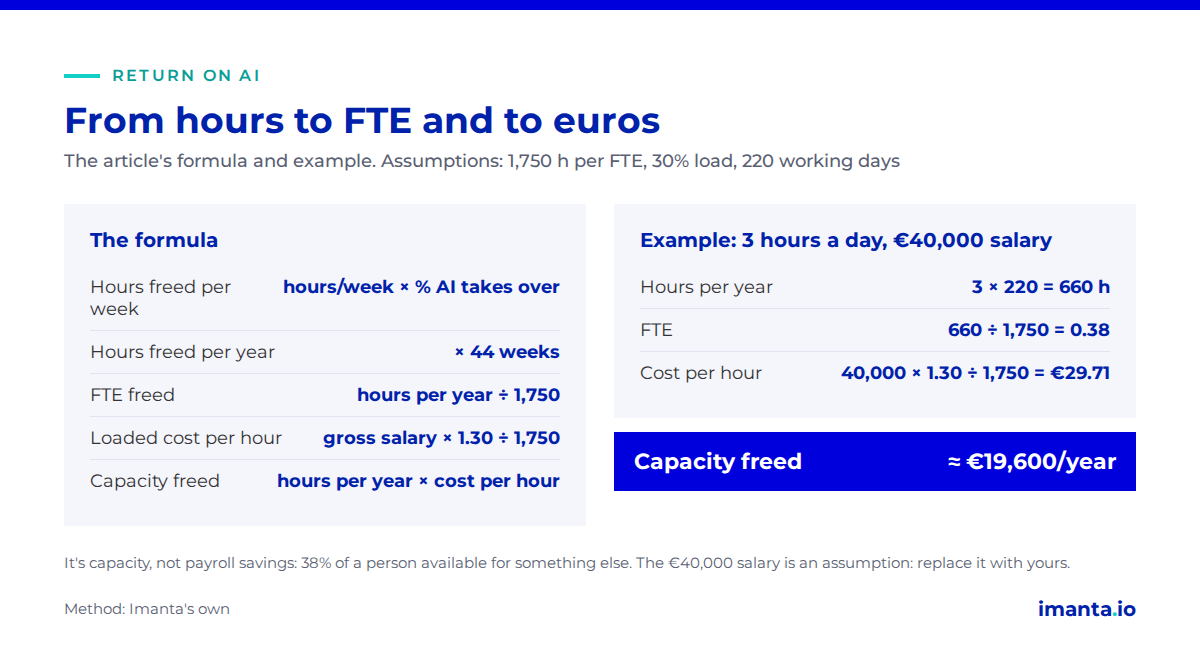
| Step | Calculation |
|---|---|
| Hours freed per week | hours/week the team spends on the task × % AI takes over |
| Hours freed per year | hours freed per week × 44 working weeks (220 days ÷ 5) |
| FTE freed | hours freed per year ÷ 1,750 |
| Loaded cost per hour | gross annual salary × 1.30 ÷ 1,750 |
| Capacity freed (€) | hours freed per year × loaded cost per hour |
Two assumptions should always be stated next to the result. The first is 1,750 productive hours a year per full-time person (one FTE): adjust it to your collective agreement or contract. The second is a 30% load on gross salary to go from salary to employer cost: adjust it to your case.
Illustrative example: an order manager who frees up 3 hours a day
This is an illustrative example of how to measure AI ROI, built on assumptions. It is not a statistic or a real case. We take as a reference a middle manager on a gross salary of €40,000 a year; replace it with your own figure. The 3 hours a day (15 a week) are time already freed, that is, after applying the percentage AI takes over. The calculation runs like this:
- Hours per year: 3 h/day × 220 working days = 660 h.
- FTE: 660 ÷ 1,750 = 0.38 FTE.
- Cost per hour: €40,000 × 1.30 ÷ 1,750 = €29.71/h.
- Capacity freed: 660 h × €29.71/h ≈ €19,600/year.
A cross-check the other way: 0.377 FTE (the 0.38 above, unrounded) × €52,000 loaded annual cost = €19,611. It adds up.
It is capacity, not payroll savings
Nobody’s pay goes down by €19,600. What you have is 38% of a person available for something else: handling more orders, responding faster, doing what was on the wish list. That is why we call it freed capacity and not savings. Hours only become money when they turn into something you can count, such as more orders shipped or shorter response times, and that second measurement is what lets you measure AI ROI honestly.
The figure so far is gross capacity. To measure AI ROI as a net figure, subtract what it costs to achieve it: the licence, implementation and training. In the example, a standard Team seat is €216 a year on annual billing, at Spanish prices. At €29.71 an hour, that is covered by about 7 hours of freed time over the year (216 ÷ 29.71 ≈ 7.3). A premium seat costs five times as much in dollars ($100 a month against $20 on annual billing), so it needs about five times as many hours, around 36. That leaves out implementation and training, so treat it as a floor, but it shows why the seat price is rarely what decides the case.
What to do with the result when you choose a plan
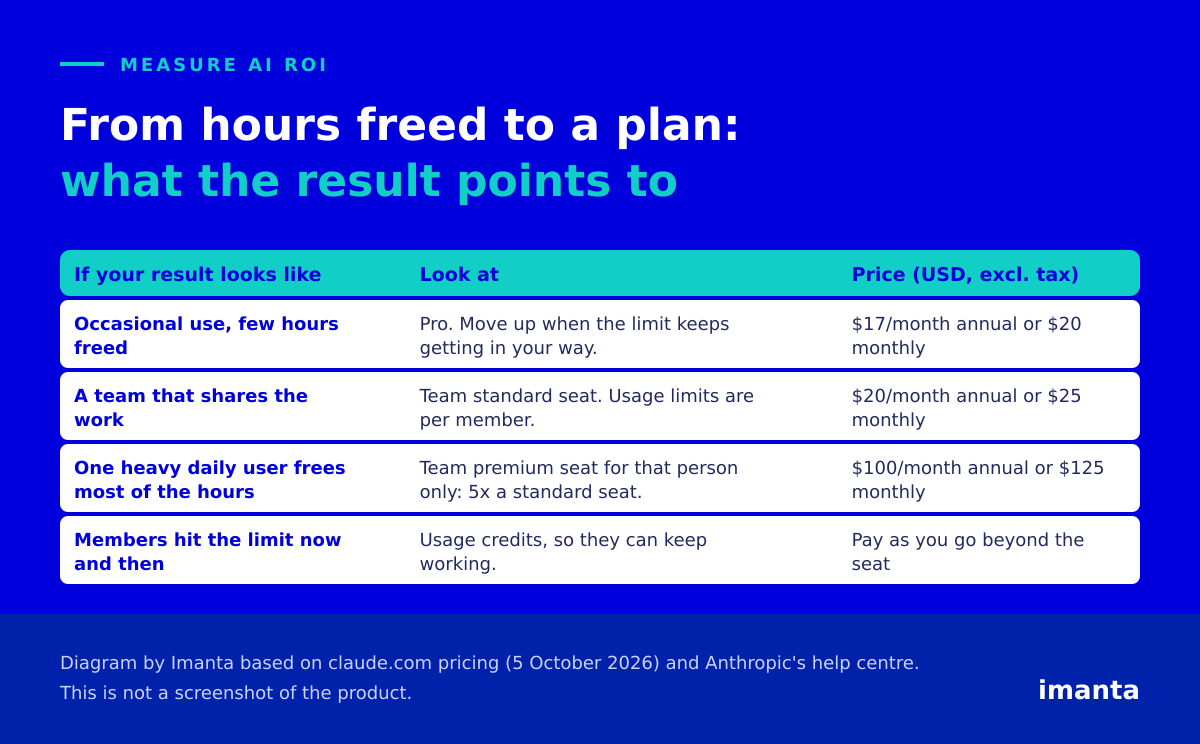
Once you measure AI ROI in hours per person, the choice tends to sort itself out. Occasional use of Claude does not justify an expensive plan: start with the cheapest one and move up when the usage limit keeps getting in your way, which is what Anthropic itself recommends. Pro costs $17 a month billed annually or $20 billed monthly.
If you are a team, a standard Team seat costs $20 per person per month on annual billing or $25 on monthly billing. Usage limits on Team are per member, so one person’s heavy use does not slow down the rest. Whoever frees up the most hours because they use Claude heavily every day may need a premium seat, at $100 per person per month annually or $125 monthly, with five times the usage of a standard seat. Give it to that person only, not to the whole team. If a member now and then hits the limit, the organisation can also enable usage credits so people keep working beyond what their seat includes. The detail of each plan is in the plans guide.
The indicators that confirm the return is real
The upfront calculation is an estimate. You confirm it when you measure AI ROI in practice, and each indicator needs its baseline (month 0) and a 12-month target. The quantitative ones are hours freed, FTE, response time and error rate. The adoption ones are the monthly active usage rate, use cases deployed, internal champions and time to get up and running. Without active usage there are no hours freed, and as a reference target we use 80% monthly active usage. There is also a commercial and compliance block, which includes the EU AI Act. These are targets to measure, not promised results.
Three mistakes that inflate the result when you measure AI ROI
The first is assuming full adoption from day one: the first year is better weighted with a quarterly adoption curve. The second is counting capacity as cash savings, as we saw above. The third is multiplying the first year by three to give a three-year figure without subtracting the recurring licences. All three make the number look better than it will turn out to be, which is the opposite of what you want when you have to defend how you chose to measure AI ROI in front of a finance director.
Frequently asked questions about how to measure AI ROI
How many hours a year is one FTE?
We use 1,750 productive hours as a stated assumption. Adjust it to your collective agreement or contract.
Can you measure AI ROI before buying?
Yes. By mapping hours per task you get an estimate before paying for any licence; the pilot confirms or corrects it.
What percentage of a task’s time does AI take over?
It depends on the task. There is no reliable generic percentage: it is estimated task by task and measured in the pilot.
Is the return on AI a cost saving?
Not directly. It is hours freed up for other work. It turns into money when those hours produce something measurable.
Where to start this week
Spend a week logging the hours your team spends on three repetitive tasks, then run them through the formula above with your reference salary to measure AI ROI. To skip building the spreadsheet from scratch, download the hours-per-task mapping template: it has the formulas already built and an example row. If you would rather have us help you apply it, our Claude page explains how we work as implementers.
Pick one task today and measure AI ROI on it before the next budget meeting.
Sources
- Calculation method: Imanta’s own, based on its process-mapping methodology (formula revised on 5 October 2026).
- Claude pricing (Spanish version), checked on 5 October 2026, excluding tax.
- What is the Team plan: seats, usage limits per member and usage credits.
- Use Claude Code with your Pro or Max plan: what to do when you hit usage limits.
Content produced by Imanta with AI assistance, reviewed and signed by Guillermo Vilarroig. Sources linked above. Data checked on the dates shown. Last reviewed: 19 November 2026.